What does the Table 2 rejection message: <errorDetails>The filename is missing.</errorDetails> indicate?
If you are experiencing this rejection message;
<reportedFilename>*unknown*</reportedFilename>
<status>Rejected_Technical</status>
<errorCode>INVALID_FILENAME</errorCode>
<errorDetails>The filename is missing.</errorDetails>
<comment>Rejected by eRR.</comment>
Then you will need to activate a property on your XP Messenger to attach a filename;
Add the property to:
ponton.ebxml2.include.processing.directives=true
and restart your Messenger application.
<reportedFilename>*unknown*</reportedFilename>
<status>Rejected_Technical</status>
<errorCode>INVALID_FILENAME</errorCode>
<errorDetails>The filename is missing.</errorDetails>
<comment>Rejected by eRR.</comment>
Then you will need to activate a property on your XP Messenger to attach a filename;
Add the property to:
ponton.ebxml2.include.processing.directives=true
to
the lib_ext folder in your installation directory
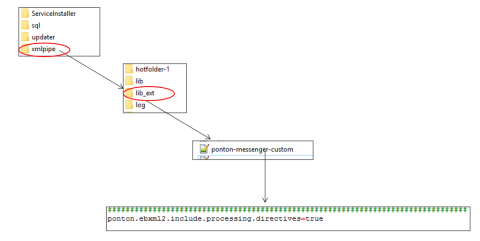
<PontonXP_Install_DIRECTORY>/xmlpipe/lib_ext/ponton-messenger-custom.properties
Please see the below screenshot of the files you will need to access in order to add the property.
This will attach the filename and the upload
should now work. If this additional property does not work and filenames
are still not getting attached to the XML file, then refer request to
the Service Team.
Please note this issue is
only relevant for clients using earlier Ponton X/P versions, for Ponton
X/P 3.11.x and higher this is no longer necessary.
Related Articles
What does the ACER XML error message "the filename is missing" mean?
In the case you receive an error message "The document is invalid... Errors: the filename is missing" with the technical receipt below: <technicalReceipt> <reportedFilename>*unknown*</reportedFilename> <status>Rejected_Technical</status> ...How can I see the rejection reason for my trade on the REMIT Transaction Screen?
To investigate the rejection reasons for trades where a magnifying glass appears on the REMIT Transaction screen you need to take the following steps: Open the file audit trail (if magnifying glass on this screen) Look for the line "Document ...My OMP file has been rejected by eRR, how can I look at the rejection reason?
My OMP file has been rejected by eRR, how can I look at the rejection reason? To investigate the rejection reasons for trades where no magnifying glass appears on the REMIT Transaction screen you need to take the following steps: Find the file ...What does the error message Erroneous date[CREATION TIMESTAMP] mean?
The "ReportingTimestamp" is used to set the "Creation Timestamp" in the REGIS-TR specific document. If a clients submission is populated with the following ReportingTimestamp > 2023-06-27T07:52:02Z < /ReportingTimestamp and submitted by the client on ...What does the login error message "You reached the daily limit for reset attempts" mean?
The maximum CMS account password resets per day is 2. In the case a password is reset for a CMS UAT (Test) or CMS Live (Production) account more than 2 time the error message "You reached the daily limit for reset attempts" will appear in the login ...